

Token Requests
tokenRequests declares tokens that must be available on the target chain before the transaction executes.
Rhinestone Warp
Rhinestone Warp routes source assets to the requested target-chain tokens as part of the intent.
User Experience
The signing dialog shows the requested token details before approval.
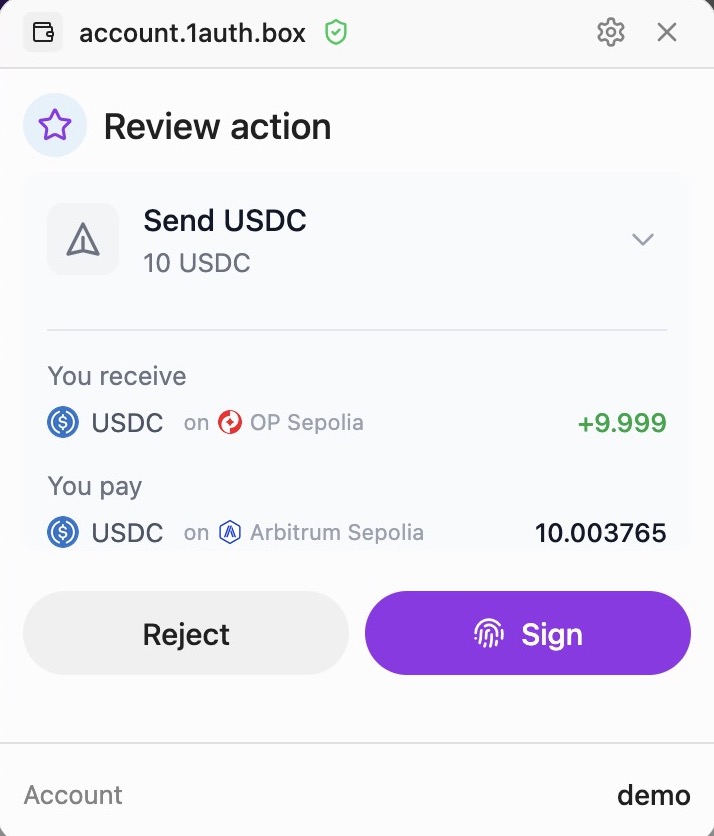
It includes the token, amount, destination chain, and cross-chain source when applicable.
When to Use tokenRequests
Use tokenRequests when your intent requires specific tokens to be delivered
on the target chain. tokenRequests are not calldata. They describe the token
output the orchestrator must provide before any app call executes.
| Scenario | tokenRequests |
|---|---|
Plain swap via sendIntent | Required - specify the output token and amount, and set calls: [] |
ERC20 transfer via sendIntent | Required - specify the token and amount being sent, and include the real ERC20.transfer call |
| Contract call needing tokens | Required - specify tokens the contract will consume |
| Native ETH transfer | Not needed - use value field instead |
How It Works
- Specify target-chain tokens with
tokenRequests. - The orchestrator checks available balances.
- It prepares funding for the requested tokens.
- The user approves the intent.
- Tokens are delivered before the calls execute atomically.
Interface
import type { Address } from 'viem';
interface TokenRequest {
token: Address; // Token contract address on target chain
amount: bigint; // Amount in base units (use parseUnits)
}Example: ERC20 Transfer
When sending USDC, tell the orchestrator you need USDC:
import { encodeFunctionData, parseUnits } from 'viem';
const USDC_BASE = '0x833589fCD6eDb6E08f4c7C32D4f71b54bdA02913';
const amount = parseUnits('100', 6); // 100 USDC
const transferData = encodeFunctionData({
abi: erc20Abi,
functionName: 'transfer',
args: [recipientAddress, amount],
});
const result = await client.sendIntent({
accountAddress,
targetChain: 8453, // Base
calls: [{
to: USDC_BASE,
data: transferData,
label: 'Send USDC',
sublabel: '100 USDC',
}],
tokenRequests: [{
token: USDC_BASE,
amount: amount,
}],
});The orchestrator can fund the transfer from eligible assets on other chains before executing it on Base.
Using with EIP-1193 Provider
The tokenRequests parameter also works with eth_sendTransaction and wallet_sendCalls:
import { createOneAuthProvider } from '@rhinestone/1auth';
const provider = createOneAuthProvider({ client, chainId: 84532 });
// Single transaction with tokenRequests
await provider.request({
method: 'eth_sendTransaction',
params: [{
to: USDC_ADDRESS,
data: transferData,
tokenRequests: [{ token: USDC_ADDRESS, amount }],
}],
});
// Batch calls with tokenRequests
await provider.request({
method: 'wallet_sendCalls',
params: [{
chainId: 84532,
calls: [
{ to: USDC_ADDRESS, data: transfer1Data },
{ to: USDC_ADDRESS, data: transfer2Data },
],
tokenRequests: [{ token: USDC_ADDRESS, amount: totalAmount }],
}],
});Constraining Source Assets
Use sourceAssets to limit which tokens the orchestrator can use as input. Entries are ERC-20 addresses; token symbols are not accepted:
const result = await client.sendIntent({
accountAddress,
targetChain: 8453,
calls: [{ to: USDC_BASE, data: transferData }],
tokenRequests: [{ token: USDC_BASE, amount }],
sourceAssets: [USDC_BASE], // Only use this token as input
});Without sourceAssets, the orchestrator can select from available balances.
Usage in Components
PayButton
<PayButton
client={client}
intent={{
targetChain: 8453,
calls: [{ to: USDC_BASE, data: transferData }],
tokenRequests: [{ token: USDC_BASE, amount }],
}}
>
Pay 100 USDC
</PayButton>See PayButton for more details.